Symphony Mac is a native macOS app inspired by OpenAI Symphony. OpenAI framed Symphony as a way to orchestrate software agents around real work items. In this project, that same idea is applied to the context I cared about most: GitHub issues, real repositories, and a local desktop app.
The project repository is here: pedrocid/SymphonyMac.
The underlying question is fairly concrete. If an agent can already implement changes, review code, or run tests, how do you organize that work so it does not remain a collection of isolated commands or conversations?
Symphony Mac answers that with an explicit pipeline:
Implement -> Code Review -> Testing -> Merge -> Done
Each issue can move through those stages with separate agents, isolated workspaces, and visible state in the UI.
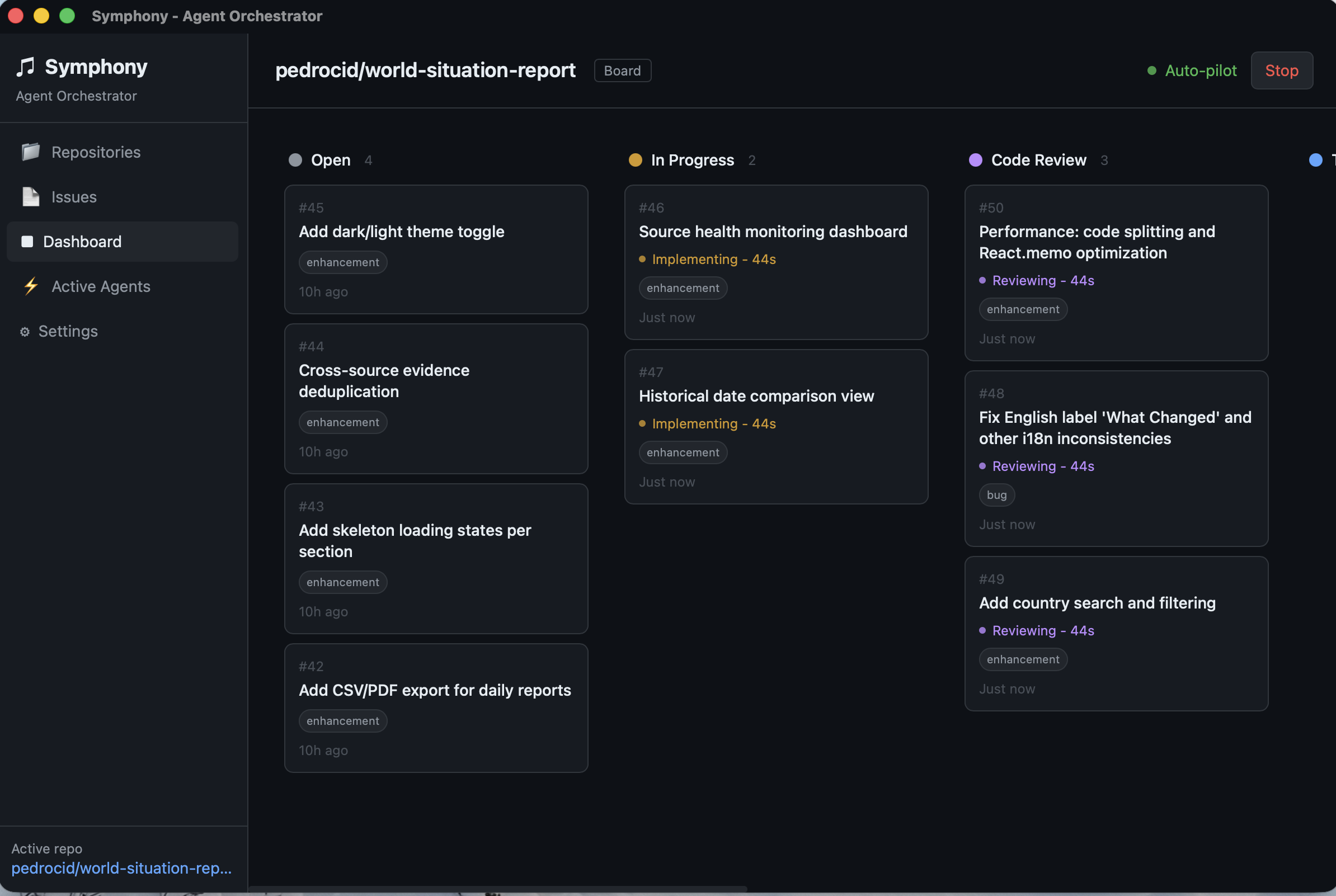 The main Symphony Mac dashboard turns agent work into something visible: issues, stages, state, and actual progress.
What problem it is trying to solve
There are already plenty of AI tools for coding that work well for one-off tasks. You give them an instruction, they generate code, and you decide what to do with the result. That is useful, but it leaves out a large part of real software work.
When you are dealing with an actual issue, generating code is usually not enough. You also need to:
- isolate the work from other tasks,
- open and track a pull request,
- review the result,
- run tests,
- handle partial failures,
- decide whether the work can advance,
- and keep a clear supervision surface around the whole process.
That is the gap Symphony Mac is trying to address. It is not trying to replace GitHub or the editor. It is trying to give operational structure to work executed by agents.
How it works
The app is built with Tauri v2, Rust on the backend and React on the frontend. For GitHub it relies on gh, so it stays close to the workflow that already exists around repositories, issues, and pull requests.
The model is fairly direct:
- A repository is selected.
- The app reads open issues.
- Each issue becomes a unit of work.
- An isolated workspace is created for that task.
- The agent for the current stage is launched.
- The result of that stage determines whether the issue advances, retries, or stops.
The important part is that the unit of work is not “a prompt.” It is an issue with state, context, and a pipeline around it.
That makes the app feel less like a chat interface with tools and more like an orchestrator.
Workspaces and local repositories
Isolation is an important part of the design. Each issue runs in its own workspace so concurrent tasks do not interfere with each other.
At first that relied on isolated clones. Later the project added support for local repositories through git worktrees, which fits much better for day-to-day use on repositories that already live on the machine.
That technical detail changes the nature of the app quite a bit. It no longer depends only on cloning and running somewhere outside your working environment. It can work close to the actual repository, with less overhead and less friction.
I think that matters because it reinforces the local character of the project. Symphony Mac is not trying to turn development into an abstract remote service. It is trying to orchestrate it from the desktop, using tools and repositories that already exist.
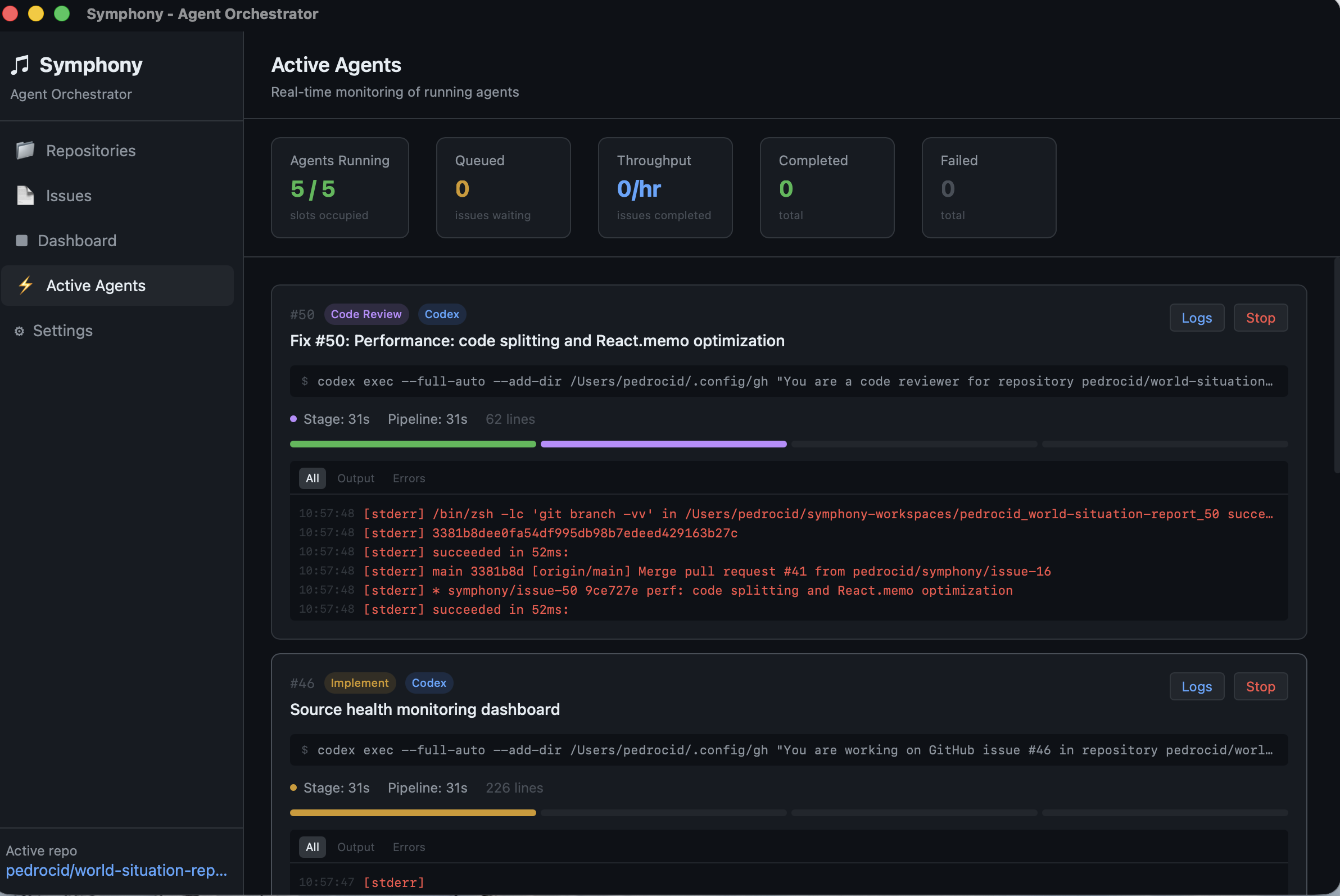 The active agents view shows real processes, streaming logs, and live state.
Visibility and control
Another central part of the project is that agent work stays exposed. The app keeps a stage-based board, an active agents view, and persistent logs so it is possible to follow what is actually happening.
That is not only a UI decision. It changes how the system is used. Once the work is represented as state rather than as text lost inside a session, it becomes much easier to answer basic questions:
- which issue is running,
- which stage it is in,
- whether the agent is still active or stalled,
- whether the pull request was created correctly,
- or whether a task failed in implementation, review, testing, or merge.
That visibility also makes something else possible: human control.
Graduated autonomy
One of the most useful aspects of Symphony Mac is that it does not assume a single autonomy model.
The app can run the pipeline in a fairly automatic way, but it also supports approval rules and manual advancement between stages. That means you are not forced into one of two extremes:
- either a fully autonomous agent,
- or a fully manual process.
You can decide which parts to delegate and where you want explicit supervision. In real software work, that kind of fine-grained control is usually more useful than the idea of total autonomy.
It is not tied to a single CLI
Another good project decision is that orchestration is not tied to one agent. Symphony Mac supports Claude Code and Codex, and it also allows custom commands.
That matters because the main value here is not the specific provider. It is the structure that organizes the work:
- how the prompt is built,
- which stage is executed,
- where it runs,
- what context it receives,
- and what happens when it finishes.
In that sense, the app works as a coordination layer above the agent.
How the project has taken shape
Looking through the project history, the evolution is fairly coherent. The initial base was the pipeline, the workspaces, the UI, and the GitHub integration. After that, more operational layers started to appear:
- persisted state,
- hung-agent detection,
- partial retries,
- multi-repo support,
- approval gates,
- configurable prompts,
- shared Rust and TypeScript contracts,
- and support for worktrees and custom agents.
What interests me about that list is not the list itself, but what it says about the project: the idea stopped being simply “run agents” and became maintain a stable system around them.
In short
The most precise way I can describe Symphony Mac is this:
a desktop app for coordinating development work executed by agents around real GitHub issues.
It interests me because it addresses a part of the problem that often gets left out of demos: not only what an agent can do, but how you integrate that work into a recognizable, inspectable, and useful workflow.
That is why drawing from OpenAI Symphony makes sense here. Not because of the interface or the branding, but because it takes seriously the idea that if agents are going to work on real software, they need more than a prompt. They need structure.
And right now, that is exactly what Symphony Mac is trying to build.